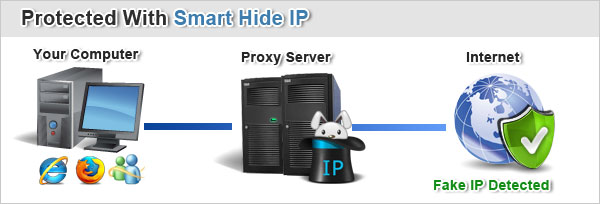
February 18, 2011 (Powerhomebiz.net) As we all know, your IP address contains a lot of online personal information which can be seen or even stolen. There are many ways hackers could gain access to your Internet protocol address. That is why you should look for means to conceal your IP in order to stay safe while enjoying some online activities. And the most common way to protect it is to use hide IP software. Recently, we have found an ideal one that is called Smart Hide IP. After you put it to use, your online privacy will be under protection.
You are able to protect your online privacy via these steps:
1. Make sure that you have already installed Adobe flash player.
2. Download Smart Hide IP from its website list at the end of this article.
3. After finishing the straightforward installation, you will get the following window as shown in the Resource Box.
4. Because of its simple interface, you can easily hide your IP by clicking the Hide IP button. Then your real IP address will be replaced with a fake one promptly. And all your online activities will be anonymous.
Don’t be suspicious. We are quite sure the procedure is that simple. Besides, it is compatible with different browsers including Internet Explorer, Firefox, and Opera. But you should re-install Firefox extensions when applying Smart Hide IP to Firefox.
 If you have some extra needs, it will provide you the following features after you purchase it:
1. You can get more high-quality IP addresses.
2. Through clicking “Select Fake Location”, you are able to choose IPs from numerous different countries.
3. You could also set to change your IP address automatically.
Smart Hide IP is an ideal tool which we strongly recommend. With it, you are able to surf anonymously without anyone threatening your privacy. For the sake of your online privacy, you’d better launch it to hide your real IP address.
Do you want to try it now? Download it from the website list in the Resource Box.
To download Smart Hide IP
For more info about online privacy, please visit my blog: Protect My Privacy
Protect your online privacy simply and efficiently
Thanks for your suggestion ! I also would like to add a professional unblocker like MicroVPN ! It’s a great software that you can use anywhere, at school or at work, to unblock websites, or to encrypt traffic and protect from your ISP filters and monitoring ! You can check its features at: microvpn.com !
Features:
very fast and cheep
multiple ip addresses
rotating ips
easy to use
surf anonymous
protect from password sniffers
New IP every 10 min
Unlimited Bandwith
Instant Activation
You can check it at: microvpn.com/
Howdy are using WordPress for your blog platform?
I’m new to the blog world but I’m trying to get started and
set up my own. Do you require any html coding expertise to make your own blog?
Any help would be greatly appreciated!